myTuner FM Radio App
- 4.6
- Rating
- 10.00M
- Installs
- Free
- Price

 Analysis by App-foxy
I usually turn to radio when I want something to accompany the day without choosing every song myself. Podcasts are useful when I want a specific subject, while music services are better for building a personal queue, but live radio still has a different feeling: local voices, scheduled shows, news, sports, music, and the small surprise of hearing what is on right now. myTuner FM is built around that simple idea, bringing live AM and FM stations into a mobile music and audio app.
After spending time with it, I see the app as a practical directory and player for people who want radio from more than one place. It is free to install, aimed at Teen users, and developed by Appgeneration - Radio, Podcasts, Games. Its popularity is easy to understand: the app has a 4.6 average from around 331 thousand ratings and has passed 10 million installs. Those figures do not make it perfect, but they do suggest that it has become a familiar choice for listeners who want a broad station-finding tool rather than a single broadcaster’s app.
The important thing is to approach it as a live-radio companion, not as a replacement for every kind of audio service. I would recommend it to someone who enjoys discovering stations, follows radio from home while travelling, or wants an uncomplicated way to listen to broadcasts on a phone. I would be more cautious about recommending it to someone who expects complete control over songs, guaranteed offline playback, or the same deep personalization found in a dedicated music subscription.
You May Also Like

 Blood Strike: 2.5 Anniversary
Blood Strike’s Loadouts Turn Every Drop Into a Tactical Gamble
A close look at Blood Strike’s custom loadouts: how fast access to signature weapons reshapes its battle royale rhythm, rewards preparation, and narrows the gap between fights.

 Pandora - Music & Podcasts
Pandora’s Music Is Easy to Start, but Harder to Recover
Pandora’s strength is its low-effort path from a seed to a station. Its weak spot is how much confidence it asks you to place in connection, setup, and quiet recovery.

 8 Ball Pool
 Is Built on Rivalries, Rematches, and Routine
A close look at the rivalries, rematches, shared routines, and unanswered safety questions that turn a quick pool match into a persistent mobile community.

 Samsung Music
’s Quiet Strength Is Playing What You Already Own
Its reach comes less from spectacle than from dependable access to a personal library. That simplicity is both the app’s strongest retention engine and its ceiling.

 AccuWeather: Weather Radar
AccuWeather Review: A Quick, Clear Forecast for Everyday Decisions
For everyday plans, the best forecast is the one you can understand quickly. AccuWeather makes rain timing, radar, and local conditions easy to act on, with a few trade-offs.

 Hill Climb Racing
Why Hill Climb Racing Still Turns Crashes Into One More Run
A tiny car, a bumpy hill and one more upgrade: Hill Climb Racing keeps resurfacing because its simple chaos makes every near-miss feel personal.
More From Our News Desk



Getting from installation to a useful station
I’d use the first session to find one station that fits a specific moment, rather than trying to explore the whole catalogue at once. Starting with a familiar broadcast gives me a useful baseline for sound and reliability; from there, I can try a station from somewhere new and see whether discovery is worth making part of my routine.
What the first screen is really for
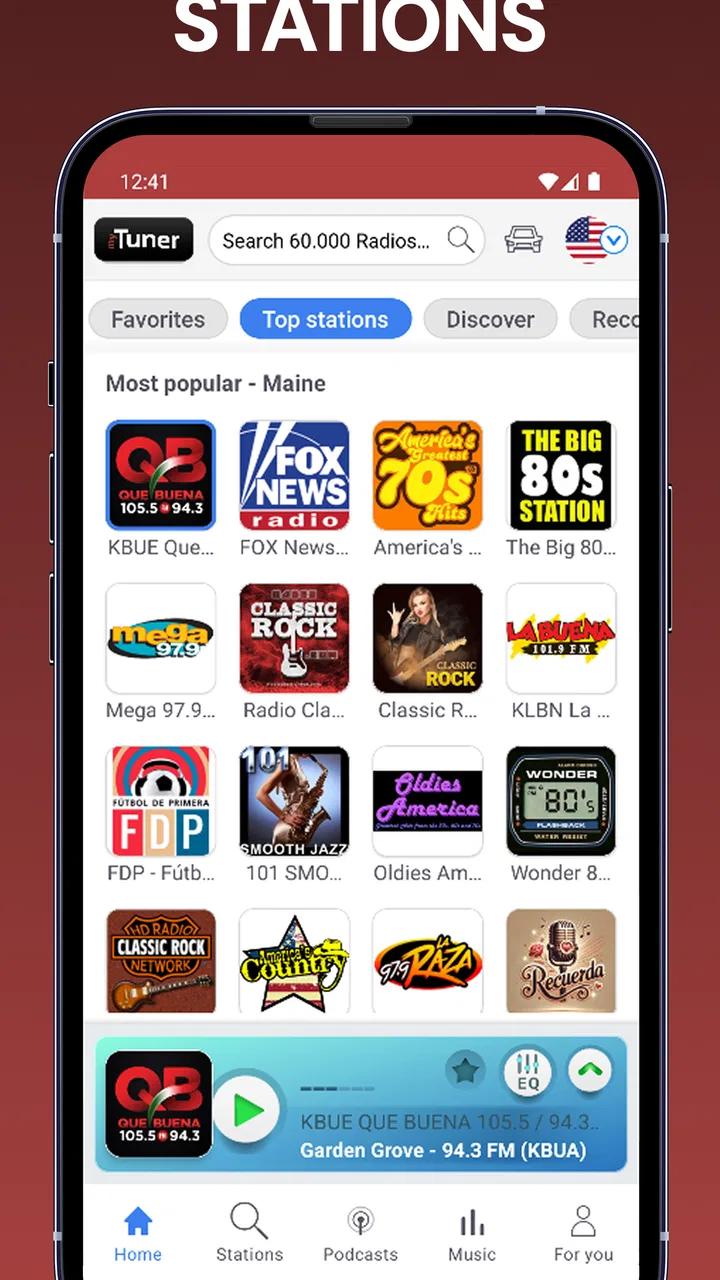
When opening a radio app for the first time, the biggest challenge is often not playback but orientation. A large station catalogue can feel like a wall of choices. With myTuner FM, I found it more helpful to think in terms of a listening goal before browsing: do I want a station from my area, a particular country, a music style, or spoken programming? That small decision makes the first session much less random.
The app’s store summary focuses on live AM and FM stations, and that is the right expectation. It is designed to help you reach a broadcast that already exists, rather than create a custom stream from individual tracks. If you enjoy the rhythm of scheduled programming, this is a strength. If you dislike interruptions, presenters, repeated station jingles, or a song ending before you can save it, the live-radio format may feel less convenient than an on-demand service.
I also like that the app can serve two different listening habits. One user may open it every morning to reach a familiar station quickly. Another may use it as a discovery tool, moving between places and formats that would be difficult to find through separate broadcaster apps. Those are very different use cases, but both make sense here.
Choosing a starting point without getting lost
For a first session, I would avoid scrolling aimlessly through every available option. Start with a station connected to a place you know or a format you already enjoy. A familiar broadcast gives you a quick test of the basics: whether the stream starts smoothly, whether the sound is comfortable on your connection, and whether the station’s programming suits the moment.
After that, try a station from another region. This is where the app becomes more interesting than a single local radio application. I found that the value is not only in the number of stations, but in the low effort required to move from a known broadcast to something unfamiliar. That makes it useful during travel planning, language practice, or simply when local radio has nothing appealing on.
A useful habit is to give a new station enough time to reveal its character. Radio schedules change, and a station that sounds ordinary for a few minutes may later move into a better programme. At the same time, do not assume that every listed station will be equally reliable or equally well presented. The app is a gateway to broadcasts, so the quality and consistency can vary from one station to another.
The first meaningful success
For me, the first real success is not merely seeing a station name. It is starting a live broadcast that fits a specific part of the day and then knowing how to return to it. A realistic example would be a commute: before leaving, I would search for a familiar news or music station, start playback, and keep that choice ready for the next morning instead of repeating the search.
That workflow also exposes an important trade-off. Radio is immediate, but it is not fully predictable. You may begin listening in the middle of a song, a discussion, or an advertisement. I consider that part of the medium rather than a fault in the player, yet anyone used to selecting an exact track should understand the difference before relying on it.
Another practical use is background listening while cooking or working. In that situation, live programming can be more pleasant than a playlist because it removes the pressure to manage the next track. I would choose a station with a consistent format, start it before my hands become busy, and avoid changing channels repeatedly. The app works best when it reduces decisions rather than creating a new browsing task every few minutes.
Small habits that improve everyday use
One of the less obvious benefits of a broad radio app is that it can separate discovery from commitment. I can sample a station briefly, notice whether the presenters, music, or pace suit me, and then decide whether it deserves a regular place in my routine. That is more efficient than installing several broadcaster-specific apps just to compare their sound.
I would also use different station types for different situations. A talk-heavy broadcast can be good when I am doing a repetitive task and want something to follow. Music radio is easier when I need to concentrate on movement or household work. A station from another country can add variety, but it may be less suitable when I need local information. Treating the catalogue as a set of contexts, rather than one giant playlist, makes the app feel more useful.
For mobile listening, I would test a station before depending on it outside the house. Live streams are naturally tied to a working internet connection, and a weak connection can change the experience. A short trial at home can tell you whether a particular broadcast starts reliably enough for a commute or a long walk. This is a simple step, but it prevents the common mistake of discovering a problem only after leaving a dependable connection.
Where new users may hesitate
The first point of confusion is the difference between a station directory and a music library. You are not choosing an individual song and building a permanent queue in the same way you would with an on-demand music service. The station decides what is being broadcast, and the app’s job is to help you reach that stream. Once that distinction is clear, the interface becomes easier to judge.
The second is the presence of commercial elements. The app is free, but it also offers in-app purchases priced from $20.99 to $22.99 per item. I would not treat the free download as a promise that every part of the experience will be free of upgrade prompts or other interruptions. Before paying, I would first establish whether the basic listening experience already solves my problem. For occasional radio use, it may be enough; for frequent daily listening, the value depends on what the paid option changes in your particular use.
A third source of uncertainty is station consistency. A radio app can present access to a station, but it cannot make every broadcaster sound identical or guarantee that every stream behaves the same way. Some broadcasts may be more polished than others, and schedules can change independently of the app. I would therefore judge myTuner FM by how easily it helps me find and return to worthwhile stations, not by expecting every listing to offer the same quality.
How it compares with the usual alternatives
The most obvious alternative is a music streaming service. That option wins when I want to choose a precise artist, replay a favourite track, build a controlled queue, or receive recommendations shaped around my listening history. myTuner FM wins when I want a live programme, a local voice, a regional broadcast, or the serendipity of not knowing exactly what will play next.
Another alternative is installing individual station apps. Those can be better if I follow one broadcaster closely and want its own news, schedule, or presentation. The disadvantage is the clutter of maintaining several separate apps for several stations. myTuner FM is more convenient for comparison and discovery because it puts different broadcasts into one listening environment.
There is also the option of listening through a station’s website. A website may be perfectly adequate for a single stream, especially on a computer, but it is less convenient when I want to move between broadcasts during a phone-based routine. The dedicated app makes more sense for someone who treats radio as a regular mobile activity. On the other hand, a website can be preferable if I only need one occasional stream and do not want another app on the phone.
Who should use it, and who should skip it
I think the app is a good fit for listeners who enjoy live programming and want more variety than the stations immediately available in their area. It is especially appealing to travellers, people with connections to more than one country, and anyone who likes using radio for atmosphere without assembling a playlist. It can also suit households where different people want to explore different kinds of broadcasts from the same device.
I would skip it if my main requirement is offline listening, exact song selection, or a completely uninterrupted audio experience. It is also not the best choice for someone who only wants a single broadcaster and already has a dependable official app for that station. In that case, the broader catalogue may add little value and could make the simple task of pressing play feel more complicated.
Teen users should also keep the content rating in mind. Live radio includes programming created by many different broadcasters, so the Teen classification is a useful reminder to apply normal judgement when choosing stations. Parents looking for tightly controlled audio should not assume that a wide radio directory provides the same level of filtering as a child-focused service.
A sensible routine after the first day
Once I had found a few stations I liked, I would stop searching and build a small personal routine around them. One station could be reserved for mornings, another for background music, and a third for occasional international listening. This approach avoids one of the app’s potential weaknesses: spending more time browsing than listening.
I would also reassess stations after several sessions rather than deciding from one short sample. Live radio changes by time of day, and a station’s best use may appear only during a particular programme. If a broadcast repeatedly fails to match my needs, I would replace it rather than blaming the whole app. The catalogue is broad enough that the right experience depends heavily on making sensible choices within it.
For people concerned about mobile data, my practical advice is to treat live radio as an active connection rather than a downloaded collection. I would use a known connection for longer sessions when possible, and I would avoid assuming that a favourite broadcast will remain available in a place with poor reception. This is not a reason to reject the app, but it is an important planning detail for commuters and travellers.
My final view after using the app
myTuner FM succeeds because it keeps the central radio habit straightforward: find a broadcast and listen to what is live. The strongest part of the experience is the breadth of choice compared with relying on one local station or a collection of separate broadcaster apps. The weakest part is inherent to the format: stations differ, live programming cannot be controlled like a personal library, and the free model may not suit people who want a completely interruption-free experience.
I would recommend installing it if you are curious about radio beyond the stations you already know. Give yourself a clear first goal, test one familiar broadcast, then explore one unfamiliar station and decide which listening situations each one fits. That path reaches a useful result quickly without requiring you to understand the entire catalogue.
My overall opinion is positive, with a clear qualification: this is a strong tool for discovering and accessing live radio, not an all-purpose music replacement. If that distinction matches what you want, the free app from Appgeneration - Radio, Podcasts, Games is an easy recommendation. If you need precise control, offline access, or a carefully managed music queue, a conventional on-demand service will probably serve you better.
For a first-time listener, the best next step is simple: choose one station for a real daily moment, such as breakfast, a commute, or evening chores, and use it consistently for a few days. If live voices, scheduled shows, and unexpected discoveries fit naturally into that routine, myTuner FM has earned its place on your phone.
FAQs for myTuner FM Radio App
01What platforms is myTuner FM Radio App available on?
myTuner FM Radio App is available for both Android and iOS devices. You can download it from the Google Play Store for Android or the Apple App Store for iOS. The app provides a seamless experience across both platforms, allowing you to enjoy your favorite radio stations on your smartphone or tablet.
02Does myTuner FM Radio App require an internet connection?
Yes, myTuner FM Radio App requires an internet connection to stream radio stations. You can use Wi-Fi or mobile data to listen to live broadcasts. Keep in mind that streaming radio over mobile data can consume a significant amount of data, so it’s advisable to use Wi-Fi when available to avoid extra charges.
03Can I listen to international radio stations with myTuner FM Radio App?
Absolutely! myTuner FM Radio App offers access to over 50,000 radio stations from more than 200 countries and territories. Whether you're interested in news, music, sports, or talk shows from around the globe, this app provides a diverse selection to cater to various preferences and languages.
04Is myTuner FM Radio App free to use?
myTuner FM Radio App is free to download and use, offering access to a wide range of radio stations without any cost. However, the app may include ads. There is also a premium version available, which offers an ad-free experience and additional features for a small fee.
05Does myTuner FM Radio App support offline listening?
No, myTuner FM Radio App does not support offline listening. It streams live radio, which requires an active internet connection. However, some stations might offer podcasts or recorded shows that can be downloaded for offline listening, but this depends on the individual station’s offerings.
Pros
- Wide range of global stations available.
- User-friendly interface for easy navigation.
- Supports background listening mode.
- Minimal buffering with stable internet.
- Customizable favorites list.
Cons
- Contains ads in the free version.
- Limited offline capabilities.
- Some stations may have regional restrictions.
- Occasional app crashes reported.
- Audio quality varies between stations.

myTuner FM Radio App
Gallery